Plain text in. The same document out. Forever.
Tailoring a resume means rewriting the words, not the layout. But every rewrite in Word is a chance for a stray indent, a 10.5 pt run or a lost bullet to creep in. This tool removes that risk by separating the two jobs completely: you own the text, it owns the formatting, and the formatting cannot drift because it is copied from your reference document rather than rebuilt from a description of it.
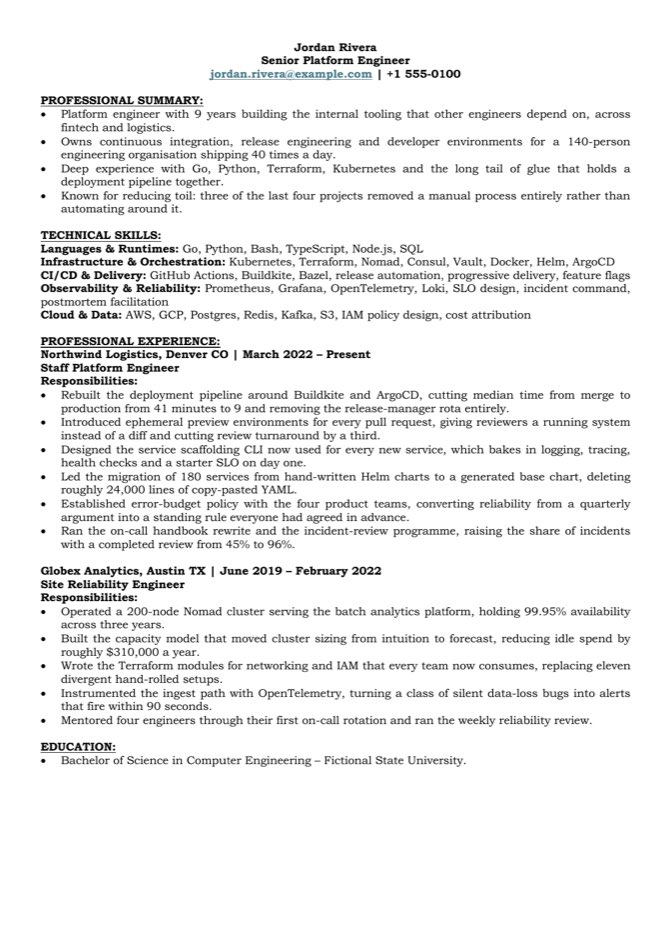
Jordan Rivera
Senior Platform Engineer
jordan.rivera@example.com | +1 555-0100

PROFESSIONAL SUMMARY:
•  Platform engineer with 9 years building
   the internal tooling other engineers
   depend on.

TECHNICAL SKILLS:
Languages & Runtimes: Go, Python, Bash

PROFESSIONAL EXPERIENCE:
Northwind Logistics, Denver CO | March 2022 - Present
Staff Platform Engineer
•  Rebuilt the deployment pipeline, cutting
   median release time from 41 to 9 minutes.
Bookman Old Style 10 pt       every run, pinned
A4, 0.5″ margins            w:pgMar 720
Bullets Symbol U+F0B7      real list numbering
Indent glyph 0″, text .25″  w:ind left=360
Body justified            w:jc both
Headers bold + underlined  ALL CAPS, colon
Email live mailto: link   rStyle Hyperlink
Skills bold label, then   one paragraph,
       the list plain        not a bullet
Spacing one blank line     before each
       exactly               section + job
Dates normalised to      EN DASH U+2013
Your text is reproduced verbatim. The tool never invents, rewords, shortens or “improves” a bullet, and never adds an employer, date, metric or credential you did not supply. If your input has no education section, neither does the output. A built-in validator diffs the finished document against your text and fails the build on any character that was dropped, added or altered.
Two steps, whichever agent you use
Download one small text file and paste one sentence. That file is the installer — readable instructions your coding agent follows: fetch the tool, check it over, put it where that particular agent looks for it, run its tests, and report back. You do not unzip anything, run any commands, or install Python.
Download INSTALL.md
Plain markdown. Read it first if you like — that is rather the point of shipping an installer as a document instead of a binary.
Paste this to your agent
Read the INSTALL.md file in my Downloads folder and follow it.
It reads the file and follows it. Expect it to check the package before installing — the instructions tell it to, and to stop if anything looks wrong.
If your agent can fetch a URL, one sentence is the whole install:
Read https://formatter.chanakyachowdary.in/install.md and follow it.
Where it ends up, per agent
There is no shared convention for this, so INSTALL.md branches on whichever
agent is reading it. For the record:
| Agent | Where the folder goes | How it gets discovered |
|---|---|---|
| Claude Code or Claude Desktop |
~/.claude/skills/%USERPROFILE%\.claude\skills\ on Windows |
Loaded automatically as a skill. Restart once after installing — skills are read at startup. |
| Codex | In your project, e.g. ./resume-formatter/ |
Codex reads AGENTS.md. A short block is appended there pointing at the tool — see below. |
| Cursor and similar |
In your project | Same block, in whichever instructions file it reads — AGENTS.md or its own rules file. |
| No agent | Anywhere | It is a plain command-line program. See Command line. |
The AGENTS.md block, if you want to add it by hand
This is what INSTALL.md appends for Codex and Cursor. Append it to an
existing AGENTS.md rather than replacing the file.
## Resume formatting

`resume-formatter/` turns a plain-text resume into a formatted .docx.

- Read `resume-formatter/SKILL.md` before using it.
- Build with: `python3 resume-formatter/scripts/build_resume.py <input.txt>`
  (use `py` on Windows). It writes a dated folder containing the .docx and a
  copy of the source text.
- Check a result with: `python3 resume-formatter/scripts/validate.py <file.docx> -i <input.txt>`
- It is a formatter, not a writer. Reproduce the user's wording exactly -- never
  reword, add or remove anything. If they want the wording changed, do that as a
  separate, explicit step first.
What INSTALL.md tells it to do
No surprises — it is a document, so you can read the whole thing first. In order:
- Download the zip and extract it to a staging folder, deliberately not to its final home yet.
- Check it: three greps proving no network access, no
evalor shell, andsubprocessonly in the test runner. It is told to stop and report if any of that fails. - Install it to the right place for whichever agent is reading — skills folder,
or project plus
AGENTS.md. - Run the test suite and confirm
76 checks, 0 failed. - Report back, and pass on how to use it.
Covers macOS, Linux and Windows, including the Windows
python3-opens-the-Microsoft-Store trap. Same claims as
Is it safe to install? below.
Just give me the files
Download the zip and put the resume-formatter folder wherever the table
above says, so that SKILL.md sits directly inside it. There is no setup step
to skip — copying the folder is the install.
You never run a command. You just ask.
Paste your resume into the chat, or point at a text file. Then say what you want. Whichever agent you use runs the tool for you — the Python underneath is not something you need to think about, or even know is there.
/resume-formatter
The skill is a slash command. Type it on its own and it asks for your resume, or paste your text straight after it and it goes. Tab-completes after the slash, so you do not have to remember the name.
“format this resume”
Plain English works everywhere — Claude Code picks the skill up from the words
alone, and Codex or Cursor use it once AGENTS.md points at the folder.
No command to memorise.
/resume-formatter
    → asks for your resume, then formats it

/resume-formatter ~/Documents/resume.txt
    → formats that file

/resume-formatter
Jordan Rivera
Senior Platform Engineer
…
    → formats the text you pasted after it
You
  /resume-formatter

  Jordan Rivera
  Senior Platform Engineer
  jordan.rivera@example.com | +1 555-0100

  PROFESSIONAL SUMMARY:
  • Platform engineer with 9 years building internal tooling.
  …

Your agent
  Done. Jordan Rivera’s resume 18 August 2026 09-14/
    Jordan Rivera - Senior Platform Engineer.docx
    source.txt

  4 sections, 16 bullets, A4, justified. Validator: 26 checks, 0 failed.
What lands on your disk
A dated folder per run, holding the document and a copy of the text that made it. Nothing is ever overwritten, so every version you have sent out stays recoverable.
Jordan Rivera’s resume 18 August 2026 09-14/
├── Jordan Rivera - Senior Platform Engineer.docx   open it, send it
└── source.txt                                      exactly what you fed in
The folder is {Name}’s resume {date} {time} and the document is
{Full Name} - {Target Title}.docx — both read off the first two lines of
your text. Two runs in the same minute get (2), (3).
Tailoring for each application
This is the workflow the tool exists for. Keep one master text file. For each posting, edit the wording — lead with what that job asks for, cut what it does not — and ask again. You get a fresh dated folder; the previous one stays untouched. Because the formatting is identical every single time, the only thing you are ever thinking about is the words.
Things worth asking for
| Say this | You get |
|---|---|
/resume-formatter“format this resume” | The default: A4, justified, Bookman Old Style 10 pt. |
| “format this on US Letter” | Letter instead of A4 — about four fewer lines per page. |
| “format this, left-aligned” | Ragged right instead of justified. |
| “check the docx matches my text” | Runs the validator: reports any character dropped, added or altered. |
| “save it in ~/Documents/applications” | The dated folder created wherever you want it. |
| “turn this docx back into plain text” | Your text recovered out of a document you built earlier. |
The tool reproduces your text exactly and has no text-generation path at all. If you want the wording improved, ask for that as a separate step, read what comes back, and format the version you actually agreed to. Keeping those two jobs apart is the whole point — it is why the output never surprises you.
Never done this before?
Start from the sample instead of a blank page. It is a complete, correctly shaped resume
for a fictional person: overwrite it line by line and you cannot get the structure wrong.
A copy is already inside the skill at resume-formatter/starter.txt.
resume-grader — score it before you send it
A separate skill, installed the same way and on its own. It scores a resume against a rubric you can read: six mechanical checks, each worth a stated number of points, each deduction naming the exact line it came from. Neither skill needs the other.
Two steps, same as above
Download the file, paste the sentence. It stages, reviews, installs and runs the grader’s own 50-check suite.
/resume-grader
Or plain English: “grade my resume”, “score this”, “how well does this match the posting?”
Read the INSTALL-grader.md file in my Downloads folder and follow it.
Read https://formatter.chanakyachowdary.in/install-grader.md and follow it.
What it gives you
  RESUME SCORE   84 / 100   (SOLID)

  Quantified impact            10.7 / 22
      16 of 66 experience bullets carry a number (24%)
      -11.3 Below the half-of-bullets convention. Numbers are the
            fastest way to turn a duty into evidence.
            • Developed RAG pipelines combining document ingestion…
            • Developed conversational AI capabilities supporting…

  Verb variety                  7.6 / 12
      21 distinct opening verbs across 66 experience bullets
      -4.4  Openers repeat heavily.
            • "Developed" starts 15 bullets
            • "Implemented" starts 11 bullets

  Strong openings   18.0 / 18     Clean language   16.0 / 16
  Bullet length     12.0 / 12     Structure        20.0 / 20
| Dimension | Points | What it checks |
|---|---|---|
| Quantified impact | 22 | Do at least half your experience bullets carry a number, percentage or amount? |
| Strong openings | 18 | Concrete verbs, not “Responsible for” or “Helped with”. |
| Verb variety | 12 | Six bullets starting “Developed” make six different things read as one. |
| Bullet length | 12 | Roughly 12–32 words. Longer stops being skimmable; shorter is usually a duty with the result missing. |
| Clean language | 16 | No “team player”, “detail-oriented”, “results-driven”. These assert a trait instead of evidencing it. |
| Structure | 20 | Reachable contact details, expected sections, every role dated. |
Against a specific posting
Give it the job ad too and it reports keyword coverage as a separate score — deliberately not folded into the first, because “well written” and “matches this job” are different questions and averaging them answers neither. It ranks the posting by prominence rather than raw frequency, so the missing-terms list contains technologies instead of ideally and comfortable. It also flags terms you have used too often, because current systems penalise stuffing rather than reward it.
It scores how the resume is written. It cannot tell whether an achievement is impressive or whether a claim is true, and it does not predict interviews — no honest tool can. Every threshold is a widely repeated convention, not a measured optimum, which is why the rubric is published rather than hidden: a score with a visible derivation is a checklist, one without is a horoscope. And it never rewrites your bullets. It points at lines and explains why.
Trivial to implement — parse the dates, subtract. Left out deliberately. Flagging gaps quietly penalises career breaks, illness, caring responsibilities and layoffs, and a tool has no business applying that on your behalf while calling it objectivity.
Every dimension with its source, an honest confidence rating, and the full list of things left out on purpose:
The input contract
Three header lines, then ALL-CAPS sections. That is the whole structure. Everything else the parser is deliberately forgiving about, because a resume you paste out of an old document is never clean.
Full Name                            ← line 1, becomes the document title
Target Job Title                     ← line 2
email@example.com | +1 555-0100      ← line 3, email becomes a mailto: link

PROFESSIONAL SUMMARY:                ← ALL CAPS, colon optional
•  A bullet.
•  Another bullet.

TECHNICAL SKILLS:
Category: item, item, item           ← bold label, plain list, NOT a bullet

PROFESSIONAL EXPERIENCE:
Company, City ST | Month Year – Month Year
Job Title
Responsibilities:                    ← optional; always emitted anyway
•  A bullet.

EDUCATION:
•  Degree – Institution.
Things you do not have to get right
| You write | It does |
|---|---|
• - * · or a tab | Recognises any of them as a bullet marker and strips it. The real bullet glyph comes from Word’s list numbering, so a typed one never reaches the document. |
professional summary | Matches case-insensitively, normalises to PROFESSIONAL SUMMARY:. SUMMARY, WORK EXPERIENCE, EMPLOYMENT HISTORY and SKILLS map to the canonical four. |
2022 - Present | Normalises to an EN DASH: 2022 – Present. Accepts -, --, –, — and to, and passes Present, Current, Till Date straight through. |
No Responsibilities: line | Adds it. Every job block gets one. |
| Curly quotes, CRLF line endings, non-breaking spaces and hyphens, trailing spaces | All folded to their plain equivalents. Real en and em dashes in your prose are left alone. |
Programming & Data, <10 minutes | Escaped correctly in the XML and rendered as the characters you typed. |
CERTIFICATIONS, PROJECTS, anything else in caps | Kept, given the same section-header formatting, with its lines as bullets. |
| Blank lines wherever you like | Treated as hints, not content. Vertical spacing follows the document’s own rule, not your blank lines. |
The tool stops with a plain-English error and writes nothing at all if the input is empty, has fewer than three lines before the first section, puts a section header before the contact line, has stray content before any section, or has no ALL-CAPS headers. A half-written document is never left behind: output goes to a temporary file and is renamed only once the build has fully succeeded.
What is actually being reproduced
The reference document was taken apart — a .docx is a ZIP of XML —
and every formatting property read out of the markup rather than guessed at from how it
looks on screen. These are the numbers that matter.
| Property | Value | Where it lives |
|---|---|---|
| Page | A4, 11906 × 16838 twips | w:pgSz |
| Margins | 720 twips (0.5″) on all four sides | w:pgMar |
| Typeface | Bookman Old Style, complex-script fallback minorHAnsi | direct run formatting, all 400 property blocks |
| Size | 10 pt (w:sz 20) | direct run formatting — not the style |
| Line spacing | Single, no paragraph gap | Normal: after=0 line=240 |
| Bullet glyph | U+F0B7 in Symbol | numbering.xml, numId 1 |
| Bullet indent | glyph at 0″, text at 0.25″ | w:ind left=360 over the style’s 720, with hanging=360 |
| Body alignment | Justified | w:jc both |
| Section headers | Bold + single underline, ALL CAPS, trailing colon | direct run formatting |
| Vertical rhythm | Exactly one empty paragraph before each section header and each job block after the first | seven empty paragraphs, nothing else |
Three deliberate departures
The reference document carries a few artefacts of having been edited by hand in Word. All three are invisible when rendered, and the tool emits the majority form rather than reproducing the inconsistency:
The stray justification
Three of the four section headers are left-aligned; EDUCATION: also carries
jc="both". On a line that never wraps, the two render identically.
The bold space
Seven of eight skills lines put the space after the label in the plain run; the eighth puts it in the bold run. Difference: well under one pixel of justification.
Five kinds of blank line
The seven empty paragraphs have five different property sets, each inherited from whatever preceded it. All seven render as the same empty 10 pt line.
Measured, not asserted
The strongest test of a formatter is whether it can rebuild the document it learned from. The reference was extracted back to plain text, fed through the tool, and the result compared against the original at three levels.
At the XML level
Seven diff hunks across 3,215 lines of markup, every one of them in the documented set of invisible artefacts above. Same paragraph count, same text in the same order.
At the rendered level
Both files put through Microsoft Word to PDF on a machine with the real font installed. Layout-preserving text extraction is byte-identical, and both are five pages.
At the pixel level
Rasterised at 100 dpi and compared: 2,339 differing pixels out of 4.8 million, maximum delta 65 of 255 — the signature of anti-aliasing, not of moved type.
Why it holds up
The style definitions are never regenerated. styles.xml,
numbering.xml, settings.xml, fontTable.xml and the
theme are copied into every build byte-for-byte; only the document body and the
mailto: link are written fresh. That means properties nobody thought to write
down — the kerning default, the OpenType ligature setting, the inherited language tag,
the 376 latent style entries — survive untouched. A generator that rebuilt the styles
from a description would silently lose every one of them it failed to notice.
Builds are deterministic. Running the tool twice on the same text produces two byte-identical files, which makes any change genuinely diffable.
Is it safe to install?
Worth asking, and worth checking rather than taking on faith. Wherever this ends up
— a Claude Code skills folder, or a project your agent reads via
AGENTS.md — it is being read as instructions in every later session, not
just parked on disk. That earns more scrutiny than an ordinary download, not less. If your
agent hesitates, that is the right instinct.
It is 25 files, all plain text, small enough to actually read. Three commands settle the parts that matter:
cd resume-formatter

# both should print nothing
grep -rnE "urllib|requests|socket|http\.client|urlopen" --include="*.py" .
grep -rnE "\beval\(|\bexec\(|os\.system|os\.popen" --include="*.py" .

# should list tests/run_tests.py and nothing else
grep -rln "subprocess" --include="*.py" .
| Claim | What it rests on |
|---|---|
| It cannot reach the network | Nothing imports a networking module. It never phones home, checks for updates, or sends your resume anywhere. |
No shell, no eval | Neither appears in any file. |
subprocess is used once | Only in tests/run_tests.py, only as [sys.executable, <script in the same folder>] — it runs the generator to test it. Nothing else is executed, ever. |
| Writes stay where you put them | The tests write in a temp directory they create and delete. The generator writes only the output folder you name. |
| No dependencies | Standard library only, so nothing is fetched at install or run time. The test suite resolves every import against the stdlib, so a package cannot creep in later. |
reference/make-template.py | A one-time development tool, shipped for provenance. Nothing invokes it. It documents how the Word template was stripped of its original author’s metadata. |
Prefer the .zip if you or your agent are reviewing — it is plain files
you can read. The self-extracting .txt installer is convenient but it is a
base64 blob, which is precisely the thing that is hard to check.
Everything, individually
The installer contains all of this already. These are here for reading offline, or for dropping into a repository.
python3.Every flag
The defaults reproduce the reference document exactly. You only reach for a flag when you deliberately want to depart from it.
| Flag | Default | What it does |
|---|---|---|
input | stdin | Path to your plain-text resume. Omit it, or pass -, to pipe text in instead. |
-d, --outdir DIR | . | Where the dated folder is created. |
-o, --output PATH | — | Exact output path. Suppresses the dated folder entirely. |
--no-folder | off | Write the .docx straight into the output directory. |
--no-source-copy | off | Skip the source.txt snapshot. |
--page-size | a4 | a4 (11906×16838 twips) or letter (12240×15840). |
--no-justify | off | Left-align the body instead of justifying it. |
--font "NAME" | Bookman Old Style | Swap the body typeface. |
--size PT | 10 | Body size in points. Accepts halves. |
Checking a document
The validator is the safety net. Run it after every build — it takes a fraction of a second and it is what stands between you and a silently mangled bullet.
python3 ~/.claude/skills/resume-formatter/scripts/validate.py "Your Name - Your Title.docx" -i resume.txt
It runs 26 checks in four families — round-trip (no character dropped, added or
altered), structure (every bullet carries the right numbering and indent, headers are bold
and underlined, blank paragraphs sit where they should, no literal bullet character in any
text run), schema (the package is well-formed and every reference resolves, so Word never
offers to repair it), and privacy (no author metadata or editing fingerprints).
--extract dumps the document back to plain text if you ever need to recover it.
The things that actually come up
The document looks different on my machine than in the screenshot
Almost certainly the font. Bookman Old Style ships with Microsoft Office — it is not part of Windows or macOS themselves, and it is not on most Linux systems. Where it is missing, the viewer substitutes a serif using the metrics declared in the document, so lines rewrap, and the page count can change.
The document itself is still correct: it names the real font, and anyone opening it in Word on a machine that has it sees the intended layout. To freeze the layout for everyone regardless, export to PDF from a machine that has the font — the font is then embedded in the PDF.
My agent refused to install it
Good. That is the correct instinct, and you should not talk it out of it. Fetching
an archive from a host it cannot vouch for and then executing code from it is worth
refusing — and an instructions folder, whether that is Claude Code’s skills
directory or a project’s AGENTS.md, deserves more caution than a normal
download rather than less: what lands there is read as instructions in every later
session, not just parked on disk. A hostile SKILL.md would be steering the agent,
and a file called run_tests.py is only named that.
The answer is review, not persuasion. Use the install prompt above: it stages the download somewhere harmless, asks the agent to read the four Python files and the markdown, and lists the specific claims to check. Everything in the archive is plain text and small enough to actually read. The three greps settle the important parts in seconds.
If your agent still objects after reading it, that is worth more than any assurance on this page — ask it what it found.
Windows: python3 opens the Microsoft Store and nothing happens
The python3 on a default Windows PATH is an App Execution Alias stub
that launches the Store, not an interpreter. It is not a broken install and reinstalling
will not help.
Use py — the Python launcher, the most reliable option on
Windows — or python. Every command on this page that says
python3 works with py substituted. You can also turn the stub
off in Settings under App execution aliases.
My agent is not picking up the tool
Claude Code: restart it. Skills are read at startup, so the tool never
appears in the session that installed it. Then confirm SKILL.md sits
directly inside ~/.claude/skills/resume-formatter/
(%USERPROFILE%\.claude\skills\ on Windows), not one level deeper —
unzipping into the skills folder twice gives you
resume-formatter/resume-formatter/, which is the usual cause.
Codex or Cursor: there is nothing to restart, but there is nothing automatic
either — they only know about the tool if your instructions file says so. Check
that AGENTS.md exists at the repo root and contains the
resume-formatting block, and that the path in it matches where you
actually put the folder.
Failing either, the command-line path works identically and needs no discovery at
all — point your agent at
resume-formatter/scripts/build_resume.py, or run it yourself. See
Command line.
My last page is nearly empty
An A4 page at these metrics holds about 63 lines, and a typical bullet takes two of them — so roughly 30 bullets per page, plus three lines of overhead per job block. US Letter holds about 59.
If your final page carries fewer than about 15 lines it reads as an accident rather than a choice. Cutting three or four two-line bullets usually pulls it back. The tool will not do this for you — editing your words is not its job.
Will this get through applicant tracking systems?
The layout is close to the safest shape there is: a single column, no tables, no text boxes, no images, no headers or footers, contact details in the body, conventional section names, and real list numbering rather than typed bullet characters. Those are the specific things that scramble or silently drop text in a parser that reads a document linearly.
The validator asserts the absence of tables, drawings, text boxes, frames, content controls and headers on every single build, so a future change cannot quietly reintroduce one.
Can I use US Letter instead of A4?
Yes: --page-size letter. The reference is A4, which is very likely an
accident of the machine it was first written on, so A4 is the default in order to
reproduce it exactly. A4 is 5 mm narrower and 18 mm taller than Letter; the
practical difference is about four lines per page.
Why is the text justified? Can I turn it off?
Because the reference is justified, and reproducing the reference is the point. It is worth knowing the trade: justification stretches word spacing to force both margins flush, which can produce pale “rivers” running down a paragraph and makes it harder for some readers to track from line to line. Accessibility guidance is generally against it for body text.
This layout is a relatively forgiving case — the measure is wide, so each space
stretches very little. If you would rather not, --no-justify left-aligns
the body and the validator adjusts its checks to match.
Does it need pip, a virtual environment, or an internet connection?
None of the three. Everything is Python standard library — the document is
assembled with zipfile and string templating. The test suite verifies this
by resolving every import against the standard library on each run, so a third-party
dependency cannot creep in unnoticed.
Something in my resume came out wrong
Run the validator with -i pointing at your text file. It compares the
finished document against your input character by character and names anything that
was dropped, added or altered, so you get a specific answer rather than a hunch.
--extract on its own dumps the document back to plain text, which is the
quickest way to see exactly what the tool thinks your content is.